Running a restaurant means juggling inventory, staff schedules, guest reviews, and marketing. Often all in the same afternoon. AI tools for restaurants promise to take some of that load off your plate. Most guides online are written by the software companies themselves, ranking their own product first. This guide covers the real categories of AI tools for restaurants. It explains what each one actually does and how to think about choosing between them, without a sales pitch attached.
What Are AI Tools for Restaurants?
AI tools for restaurants are software platforms that use machine learning and automation to handle tasks that used to require manual effort. Instead of a manager guessing how much chicken to order or manually replying to every Google review, these tools analyze data. They either make a recommendation or act automatically.
The category has grown quickly. Restaurant margins are thin. Small operational improvements add up fast. A tool that shaves a few percentage points off food waste can meaningfully change a location’s monthly profit. The same is true for a tool that recovers a handful of lapsed customers.
Main Categories of AI Tools for Restaurants
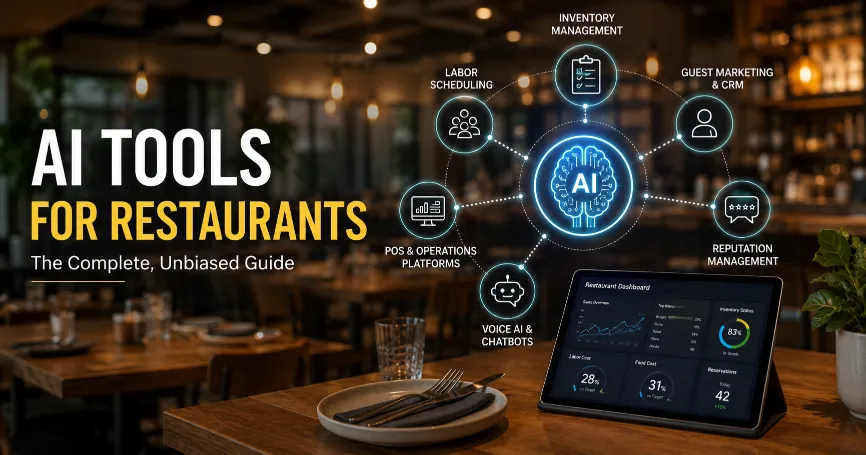
Most AI tools for restaurants fall into a handful of clear categories. Understanding these first makes it much easier to evaluate any specific product.
Guest marketing and CRM. These tools track guest visit history. They automatically send offers, win-back campaigns, and loyalty rewards through email, SMS, or app notifications.
Food waste and inventory management. These platforms forecast demand and track stock levels. They flag overordering before it turns into spoilage.
Workforce and labor scheduling. AI-driven scheduling tools predict busy periods. They build staff schedules that match expected demand instead of guesswork.
POS and operations platforms. Many point-of-sale systems now include AI-powered reporting. Menu engineering suggestions and sales forecasting come built directly into the checkout system.
Reputation and review management. These tools pull in reviews from multiple platforms. They use AI to draft responses and surface patterns across locations for multi-unit brands.
Voice AI and chatbots. Phone-answering AI and website chat assistants handle reservation requests and common questions. Staff stay on the floor instead of answering calls.
Leading AI Platforms for Restaurant Operations
Within these categories, a handful of platforms come up repeatedly across independent reviews and industry comparisons. This is not a ranked list. The right fit depends heavily on restaurant size, POS stack, and specific pain points.
Toast functions as a full POS system with built-in AI reporting, online ordering, and guest marketing. It is a common starting point for restaurants that want fewer separate tools.
7shifts focuses specifically on labor scheduling and forecasting. It predicts staffing needs based on historical sales patterns.
MarketMan and Apicbase both concentrate on inventory and food cost management. They track recipe costs and flag waste at the ingredient level.
Lineup.ai specializes in AI demand forecasting. It predicts hourly sales and labor needs using POS history along with external signals like weather.
Momos focuses on guest experience and reputation management. It pulls reviews and messages from multiple platforms into one dashboard for multi-location brands.
Slang.ai handles inbound phone calls with conversational voice AI. It answers common questions and routes reservation requests without requiring staff to leave the floor.
SevenRooms and BentoBox lean toward reservation-driven and website-driven marketing. This suits full-service and event-heavy restaurants more than fast-casual operations.
Restaurants with a single location often do well starting with one focused tool in their highest-pain category. Multi-location operators tend to benefit more from platforms built specifically for cross-location reporting.
AI Tools for Restaurant Marketing
Marketing AI tools help businesses turn first-time visitors into loyal, repeat customers.. They do this without requiring constant manual outreach.
What these tools typically automate:
- Win-back campaigns targeting guests who have not visited in 60 to 90 days
- Birthday and anniversary offers sent automatically
- Post-visit review requests timed a few hours after a check closes
- Segmented promotions based on visit frequency or average spend
The most effective marketing automation connects directly to your POS system. That connection is what allows a platform to know who is a first-time guest versus a regular. Tools that rely on manual data exports tend to fall out of use quickly. Keeping the data up to date otherwise requires a significant amount of ongoing effort
For restaurants without an existing customer database, this category delivers less value at first. Basic data collection, like capturing emails or phone numbers at checkout, needs to already be in place.
AI Tools for Restaurant Management
Management-focused AI tools cover the operational backbone of running a restaurant day to day. This is separate from guest-facing marketing.
This category typically includes:
- Labor scheduling that adjusts to predicted demand
- Digital checklists and food safety compliance tracking
- Multi-location performance dashboards
- Recipe and menu costing tools
Tools like Jolt and SafetyCulture focus specifically on compliance and task management. They replace paper checklists with digital logs that managers can review remotely. Restaurant365 and SynergySuite take a broader approach. They combine accounting, inventory, and scheduling into one back-office system for multi-unit groups.
The right choice here depends heavily on team size. A single independent restaurant rarely needs the full back-office suite that a 20-location chain requires. Paying for unused complexity is a common, avoidable cost.
AI Tools for Reducing Operational Costs in Restaurants
Cost reduction is where AI tools for restaurants often show the clearest, most measurable return. This happens mainly through food waste reduction and smarter purchasing.
Food waste and demand forecasting tools analyze historical sales, seasonality, and local trends. They predict how much of each menu item to prepare. This directly reduces overproduction, one of the largest and most preventable sources of food cost loss in most kitchens.
Portion control monitoring compares theoretical ingredient usage against actual usage. It flags inconsistencies that quietly inflate food costs over time.
Labor forecasting reduces both overstaffing during slow periods and understaffing during rushes. Both carry real costs. One shows up as wasted wages. The other shows up as lost sales and poor service.
Automated invoice and purchasing tools, like MarginEdge, reduce the staff hours spent manually entering vendor invoices. They also cut down on time spent reconciling costs against orders.
None of these tools eliminate costs instantly. Most operators see measurable savings within the first few weeks to months of consistent use. The exact timeline depends on how clean the underlying sales and inventory data already is.
Comparison Table: AI Tools by Category
| Category | Example Tools | Primarily Solves |
|---|---|---|
| Guest marketing/CRM | Momos, Popmenu | Repeat visits, loyalty, reviews |
| Food waste/inventory | MarketMan, Apicbase, PreciTaste | Overordering, spoilage, food cost |
| Labor scheduling | 7shifts, HotSchedules, Lineup.ai | Staffing accuracy, labor cost |
| POS/operations | Toast, Lightspeed, TouchBistro | Sales data, reporting, checkout |
| Reputation management | Momos, SafetyCulture (compliance-adjacent) | Reviews, guest sentiment |
| Voice AI/chatbots | Slang.ai | Phone coverage, reservations |
This table is meant as a starting map, not a ranking. A restaurant’s actual priorities should decide which row matters most.
How to Choose the Right AI Tool for Your Restaurant
A few practical questions can quickly narrow down the best options.
What is your single biggest operational pain point right now?
Starting with one focused tool in that area beats adopting five tools at once. Using none of them well helps no one.
Does it integrate natively with your existing POS?
Tools requiring manual CSV exports tend to get abandoned within a few months. This happens regardless of how good the underlying features are.
How many locations do you operate?
Single-location restaurants rarely need enterprise-tier multi-location reporting. That complexity often adds cost without adding value.
What is the realistic training burden for your staff?
A tool your team never fully learns to use delivers no return. This holds true no matter how capable it is on paper.
Common Challenges When Adopting AI Tools
Restaurants commonly run into a few predictable obstacles when adopting AI tools. Knowing them ahead of time makes the transition smoother.
Data quality issues. Many of these tools depend on clean historical sales and inventory data. Restaurants with inconsistent record-keeping often need a short cleanup period first. Only then does AI forecasting become accurate.
Staff resistance. New technology often meets resistance simply from unfamiliarity. Clear, short training sessions help. Framing the tool as reducing manual work, rather than adding oversight, tends to improve adoption too.
Integration gaps. Not every tool connects cleanly with every POS system. Confirming compatibility before committing to a contract avoids a costly mismatch later.
Upfront cost concerns. Many of these platforms charge monthly per-location fees. That can feel significant for a single independent restaurant. Starting with the highest-impact category, rather than adopting a full suite immediately, keeps initial costs manageable.
Getting Started With AI Tools for Restaurants
A reasonable rollout does not require adopting every category at once.
- Identify your single biggest pain point, whether that is food waste, scheduling, or guest retention
- Choose one tool built specifically for that category rather than a broad, all-in-one suite
- Confirm it integrates with your current POS before signing a contract
- Run a short trial period and track a specific, measurable metric, like food cost percentage or repeat visit rate
- Expand to a second category only once the first tool is fully adopted by your team
This staged approach avoids a common mistake. Many restaurants adopt several platforms simultaneously and never use any of them to their full potential.
Why Vendor Comparisons Deserve Some Skepticism
Nearly every “best AI tools for restaurants” article online is published by a company selling one of the tools being compared. That does not make the information useless. It does mean the ranking usually favors the publisher’s own product.
A few signs are worth watching for when reading any comparison, including this one. Check whether the article names specific weaknesses of the recommended tool, not just competitors. Check whether pricing is transparent or requires a sales call. Check whether independent sources, not just the vendor’s own case studies, back up any bold claims.
This guide named specific tools by category rather than ranking one as universally best, since the honest answer depends entirely on your restaurant’s specific situation.
Read More: AI Tools for Small Business Social Media Consistency
Frequently Asked Questions (FAQs)
1. What are the best AI tools for restaurants?
There is no single best tool. The right choice depends on your specific pain point. Guest marketing, food waste, labor scheduling, and reputation management each have different leading platforms, covered in the categories above.
3. Can small, independent restaurants use AI tools effectively?
Yes. Many platforms offer entry-level plans built specifically for single-location operators. Starting with one high-impact category tends to work better than adopting a full enterprise suite too early.
4. Do AI tools for restaurants replace staff?
Generally no. Most tools are designed to reduce manual, repetitive tasks like data entry, review responses, and building. This frees staff time for guest-facing work rather than replacing roles outright.
5. How long does it take to see results from AI tools for restaurants?
Most operators see measurable changes within a few weeks to a few months. The timeline depends on the category and how clean the existing sales and inventory data already is.
6. What is the difference between AI tools for restaurant marketing and restaurant management?
Marketing tools focus on guest-facing communication and retention, like win-back campaigns and review requests. Management tools focus on internal operations, like scheduling, compliance, and inventory, that guests never see directly.
7. Which AI platforms lead in restaurant operations right now?
Leading platforms vary by category. Toast leads in combined POS and operations. 7shifts and Lineup.ai lead in labor forecasting. Momos leads in guest reputation management. No single platform leads across every category at once.
Conclusion
AI tools for restaurants span a wide range of categories. These include guest marketing, food waste reduction, labor scheduling, and reputation management. No single platform covers every need well. Most vendor blogs comparing these tools have an obvious incentive to rank their own product first. The more useful approach starts with identifying your restaurant’s biggest specific pain point. Choose a tool built for that category. Confirm it integrates cleanly with the systems you already use before expanding further.
This guide reflects general information about publicly available restaurant technology platforms as of 2026. Pricing and features change frequently, so confirm current details directly with each vendor before making a purchasing decision.